
I'm seeing too many dev teams treat AI like an open tab. If you’re using GitHub Copilot CLI, you need to use the right tool for the job to keep costs down
Here is the updated list of cost-saving tips for GitHub Copilot, including the new recommendation for managing sessions.
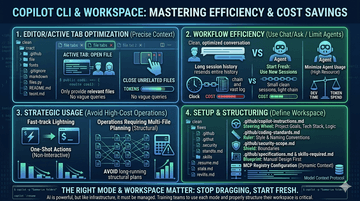
1. Editor/Active Tab Optimization
Active Tab: Open File – Copilot relies heavily on context. By opening only relevant files in your IDE tabs, you provide it with clear, focused context. This leads to more precise completions and reduces the need for the model to guess or generate irrelevant code, which saves processing "tokens."
Close Unrelated Files – If you switch tasks, close the files from your previous task. Irrelevant context "distracts" the model and wastes token count without improving suggestions.
2. Workflow Efficiency (Use Chat/Ask)
Open New Sessions Instead of Long Sessions – Avoid keeping a single chat session open for your entire work day. Long sessions accumulate massive amounts of context history. Every new prompt in that long session resends the entire history to the model, geometrically increasing token usage and cost. When you finish a distinct task or sub-task, close the chat session and start a fresh one.
Use Chat (Ask) for Simple Tasks – Instead of using complex "Agent" modes (if available in your plan) or large prompts for simple things, use the basic Ask/Chat function.
Minimize Agent Usage – Agent modes are expensive because they perform multiple automated steps, multiple model calls, and read/write multiple files. They can burn through your monthly allotment very quickly. Use standard Chat for most queries (syntax help, simple function generation).
3. Strategic Usage (Avoid High-Cost Operations)
Plan is High Cost – Operations that require multi-file, structural planning from the AI are high cost. These types of requests often use advanced reasoning models and require large context windows, making them expensive.
4. Setup and Structuring (Scope Your Project Carefully)
The way you organize your project structure—using .md markdown files—critically reduces the "trial and error" that costs money.
Scope Project with MD Files – By defining everything clearly in your repository using markdown files, you create a focused, affordable context window for Copilot. This reduces vague queries.
Copilot Instructions – Create .github/copilot-instructions.md. Use this to explicitly tell the AI your project's main goals, tech stack, and logic, rather than having it re-learn this via vague chat prompts.
Coding Styles and Naming Conventions – Put your style guide in .github/coding-standards.md. When Copilot respects these standards from the start, you spend less "spend" on correcting its syntax later.
Security Agents/Constraints – Clearly document any security boundaries in .github/security-scope.md. This prevents wasting tokens on generated code that you will ultimately have to reject for security reasons.
Specs/Skills – Create clear .github/specifications.md and .github/skills-required.md. This forces you to plan the project manually first, ensuring you use the AI only for implementation, rather than using expensive AI time for basic software design.
MCP (Model Context Protocol) – If your plan uses or plans to use MCP servers for dynamic context, configure your MCP registry carefully to ensure it's only looking at relevant databases, reducing extraneous context fetching that can add to cost.
#GitHubCopilot #DevOps #SoftwareEngineering #AICostOptimization #DeveloperTools #TechStack

![[MVP Hook 2] Đừng xây biệt thự khi khách hàng chỉ cần một chỗ trú mưa](/_next/image?url=https%3A%2F%2Fdzpd8l05gmlinfrk.public.blob.vercel-storage.com%2Fuploads%2Fnews%2Fsmall%2F1788593291-3iu67x.jpg&w=256&q=75)

