
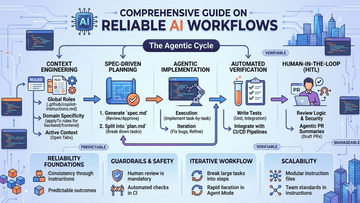
Combine Copilot’s automated testing and PR summaries with human-in-the-loop oversight.
Think of a reliable AI workflow as a team project where the AI is your fast assistant and you are the lead architect. To get the best results, follow these five simple steps:
1. Give Clear Rules
AI works best when it knows your style.
Create a Rulebook: Make a simple file (like .github/copilot-instructions.md) to list your coding rules.
Keep Tabs Open: Keep your main files open so the AI can "see" what you are working on.
2. Make a Plan
Don’t just start typing. Ask the AI to write a blueprint first.
Review the Idea: Check the plan to make sure it makes sense before any code is written.
Small Steps: Break big jobs into tiny, easy tasks.
3. Build it Piece by Piece
Instead of asking for a whole app, ask for one small part at a time.
Fix as You Go: If the AI makes a mistake on one small step, fix it right then. It's much easier than fixing a giant mess later.
4. Test Everything
Always check if the code actually works.
Ask for Tests: Have the AI write "tests" (automatic checks) to make sure its code does what it's supposed to do.
Automate: Set up your system to run these checks every time you save.
5. Final Human Check
The AI might be smart, but you are the boss.
Read the Code: Always look over the AI's work for safety and logic.
Summary: Use the AI to write a quick summary of what it changed so you can review it faster.
The Goal: You do the thinking, the AI does the typing, and your code stays high-quality
#SoftwareDevelopment #AI #Coding #ProgrammingTips #GitHubCopilot #CursorAI #Claude