DuckLake keeps data in Parquet but moves all table metadata into SQL tables, using a primary key on snapshot ids to detect conflicting commits. We look at the mechanism and its limits.
A lakehouse table that receives a small insert every few seconds has a bookkeeping problem. In file-based table formats each commit writes new metadata files next to the data, and readers must walk a chain of them to plan a query. DuckLake, whose 1.0 specification the DuckDB team announced on April 13, 2026, takes the opposite route: keep the data as Parquet files, but store all table metadata in an ordinary SQL database and let that database's transactions arbitrate commits.
The question here: what does moving the catalog into SQL buy, what does it cost, and how do concurrent writers actually behave?
Background: where lakehouse metadata normally lives
Open table formats such as Apache Iceberg describe a table with metadata kept as files in object storage (a table metadata file, manifest lists and manifests), usually with a separate catalog service pointing at the current metadata file. That design needs no database but turns every commit into several small object-store writes. Ongoing Iceberg v4 discussions, per secondary summaries I read in search results but did not verify against the project's design documents, aim at reducing that overhead with single-file commits; they are proposals, not a shipped spec. I use this only as context and do not compare performance.
DuckLake's documentation states its premise directly: it "uses SQL tables and queries to define the catalog information (metadata, statistics, etc.)" and uses Parquet files to represent the tables themselves. The catalog database must support transactions and primary key constraints as defined by SQL-92.
How it works
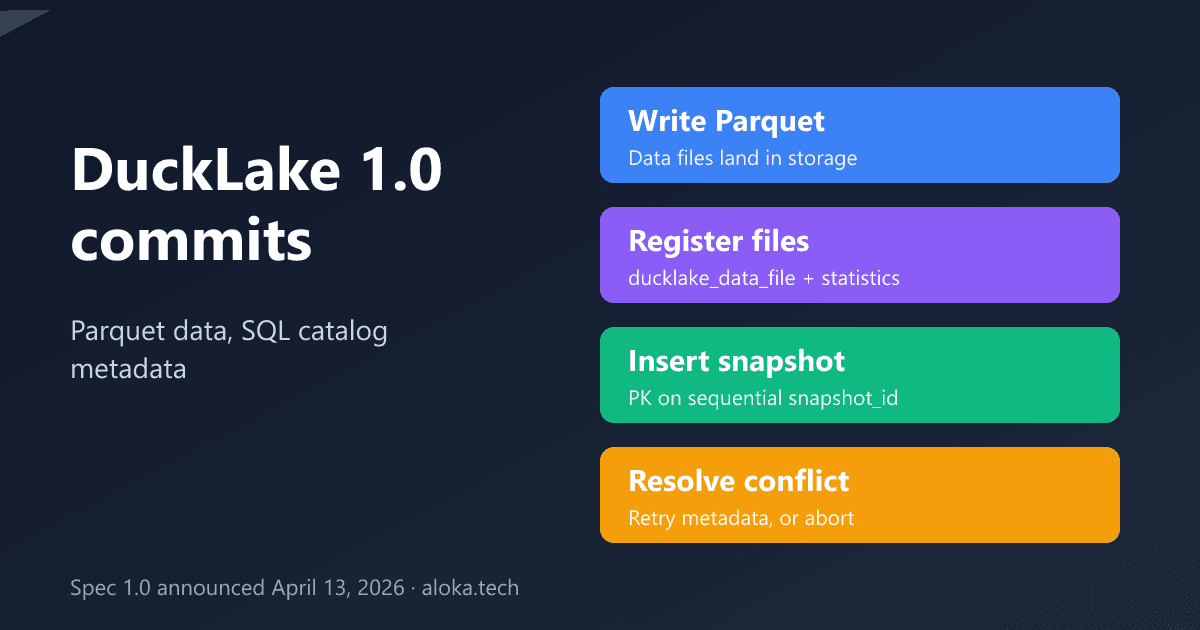
The specification defines catalog tables such as ducklake_snapshot, ducklake_snapshot_changes, ducklake_data_file, ducklake_delete_file, ducklake_table, ducklake_column and ducklake_schema_versions. The write path, as documented, is:
- Parquet data files are written to storage.
- Rows describing those files and updated statistics are registered in the catalog.
- A new row goes into
ducklake_snapshot(snapshot id, time,schema_version,next_catalog_id,next_file_id) and a row intoducklake_snapshot_changesthat records what changed and, optionally, author and commit message.
Any change to data requires a new snapshot, and the new id is the current maximum plus one. An UPDATE is modeled as a DELETE plus an INSERT in one transaction, and deletes are merge-on-read: they add delete files instead of rewriting data files.
Deep analysis: conflicts are primary-key collisions
The conflict-resolution page explains the interesting part. Snapshot ids are sequential and ducklake_snapshot has a primary key on snapshot_id. If two connections try to commit the same id, one fails with a key violation. DuckLake then reads ducklake_snapshot_changes to see what the winner changed. If there is no logical conflict, it retries the transaction in the metadata catalog "without rewriting any data files." If there is one, the commit aborts and the user is told.
The documented conflict examples: both snapshots create the same table or view name in a schema; both delete from the same underlying data file; or one inserts into a table another dropped or altered. Deletes against different data files in the same table, and compactions of different files, can commit concurrently. The notable design consequence is that expensive work (writing Parquet) is not redone on a metadata-only collision, so retries are cheap.
The 1.0 announcement page I could fetch was a stub; secondary summaries (MotherDuck and the DuckDB 1.5.2 release post, seen only in search results) mention data inlining, sorted tables, bucket partitioning and Iceberg-compatible deletion buffers. I did not read those pages in full, so treat the feature list as unverified detail. The specification pages I read are for version 1.1, and the docs say attaching a 1.0 catalog with AUTOMATIC_MIGRATION TRUE upgrades it to 1.1; without that option the catalog stays at 1.0.
Comparison: choosing the catalog database
Concurrency depends almost entirely on the catalog you pick. From the DuckLake documentation:
| Catalog | Documented fit | Concurrency note |
|---|---|---|
| DuckDB file | Local, single client | One process attaches at a time unless all use READ_ONLY |
| SQLite | Local, several clients | One writer at a time; lock conflicts are retried, but a lock error on the final COMMIT is not |
| PostgreSQL (12+) | Multi-user, remote clients | Built for concurrent users |
| MySQL (8+) | Not recommended | Known issues from the DuckDB MySQL connector |
Against file-based formats, the trade is a hard dependency on a running transactional database in exchange for fast, transactional metadata operations. I have no verified benchmark comparing the two, so I make no speed claim.
Practical example
Untested sketch following the documented syntax; it assumes a DuckDB version that supports the ducklake and postgres extensions (the stable docs page I read says DuckDB 2.0.0 or later, so check your version) and an existing PostgreSQL database named ducklake_catalog.
INSTALL ducklake;
INSTALL postgres;

ATTACH 'ducklake:postgres:dbname=ducklake_catalog host=localhost' AS lake
    (DATA_PATH 'data_files/');
USE lake;

CREATE TABLE events (id BIGINT, ts TIMESTAMP, payload VARCHAR);
INSERT INTO events VALUES (1, now(), 'hello');

-- Inspect the catalog directly from the PostgreSQL side:
-- SELECT snapshot_id, schema_version FROM ducklake_snapshot ORDER BY snapshot_id;
A reproducible test for your own workload: run two or more writers inserting small batches into one table, then two writers deleting from the same file, and count commits, retries and aborts with PostgreSQL as the catalog. Repeat with the DuckDB-file catalog to see the single-process limit first-hand.
Limitations and failure modes
- The catalog is the single point of failure. Losing or corrupting the SQL database loses the map to your Parquet files. Back it up like any production database.
- Logical conflicts still fail. Two writers deleting from the same data file will not both succeed; applications need retry or partition their writes.
- Catalog choice limits scale-out. The DuckDB-file and SQLite options are explicitly local.
- Version coupling. The spec moved from 1.0 to 1.1 with an opt-in migration, and the extension's DuckDB version requirement is a deployment constraint.
- Ecosystem breadth. I did not verify which engines beyond DuckDB read and write DuckLake today.
Engineering recommendations
Use DuckLake with a PostgreSQL catalog if more than one process or machine writes. Use the DuckDB or SQLite catalog for single-user analytics. Design writers so concurrent deletes touch different files, run compaction as a scheduled job, and pin DuckDB, extension and spec versions explicitly. Monitor catalog database size and latency, since every commit goes through it.
Conclusion
DuckLake replaces a tree of metadata files with a handful of SQL tables, and uses a primary key on sequential snapshot ids as its commit protocol. The next step: stand up a throwaway PostgreSQL catalog, run the two-writer test above, and look at the contents of ducklake_snapshot_changes after each conflict to see exactly what the format considers a conflict.
Sources
Information as of October 28, 2026.
- DuckDB team, DuckLake v1.0 announcement (April 13, 2026; stub page): duckdb.org/2026/04/13/ducklake-10.html
- DuckLake specification introduction (v1.1): ducklake.select/docs/stable/specification/introduction
- DuckLake specification, queries and snapshots: ducklake.select/docs/stable/specification/queries
- DuckLake conflict resolution: ducklake.select/docs/stable/duckdb/advanced_features/conflict_resolution
- Choosing a catalog database: ducklake.select/docs/stable/duckdb/usage/choosing_a_catalog_database
- DuckLake with DuckDB, introduction: ducklake.select/docs/stable/duckdb/introduction
I read these documentation pages but did not run DuckLake; the SQL is untested, the 1.0 feature list and Iceberg v4 context come from search summaries, and no benchmark was verified.