PostgreSQL 19 adds an online table rewrite that holds its exclusive lock only briefly. Its limits, and the default changes that affect upgrades, decide whether it is safe for you.
A bloated 400 GB table forces a familiar choice. VACUUM FULL and CLUSTER rewrite it into a compact file, but both hold an ACCESS EXCLUSIVE lock for the whole rewrite, so every read and write on that table waits. Most teams therefore live with the bloat, or reach for an extension such as pg_repack. PostgreSQL 19 puts an online rewrite into core: REPACK (CONCURRENTLY).
The question for this article: what does the core implementation actually guarantee, where does it still lock or fail, and which PostgreSQL 19 defaults will surprise you at upgrade time?
Status check first. PostgreSQL 19 is not generally available as of October 28, 2026. The RC 1 announcement (October 15, 2026) says GA is planned for November 19, 2026, with RC 2 on November 12 if needed. The release notes page I read still carried the placeholder date "2026-??-??" and was marked as RC1-level, so details may still change.
Background: why table rewrites hurt
PostgreSQL's MVCC leaves dead row versions in the heap. Plain VACUUM makes that space reusable inside the file but rarely shrinks the file. To return space to the OS or to restore physical order you must write a new file. Until now that meant VACUUM FULL or CLUSTER (both exclusive), or a trigger-based extension. In 19, REPACK is the single command for this; per the release notes the older commands remain for compatibility.
How REPACK (CONCURRENTLY) works
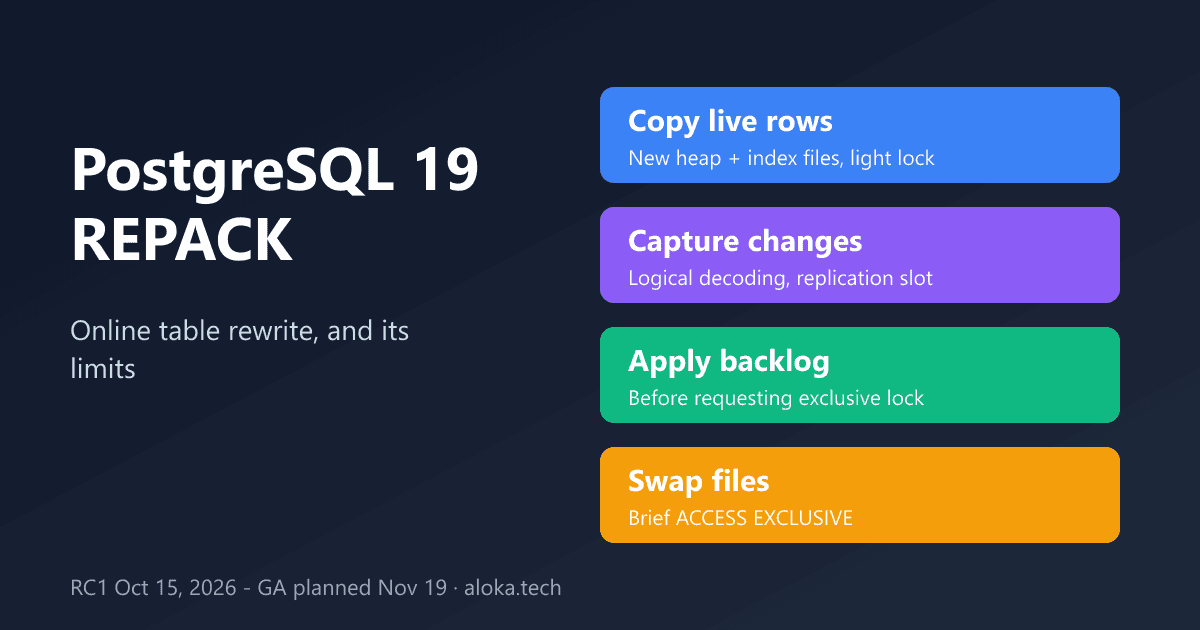
The 19 documentation describes the mechanism in three steps:
- The table is copied into a new file, skipping dead tuples, and a new file is built for each index.
- While that copy runs, the bulk of the operation holds only a
SHARE UPDATE EXCLUSIVElock. Concurrent changes are captured with logical decoding. - The captured changes are applied before
ACCESS EXCLUSIVEis requested. After the lock is obtained, a final pass applies what remains and the files are swapped.
The docs say the exclusive lock is therefore "typically held for a short time, depending on the amount of changes accumulated while the lock was being waited for." Without CONCURRENTLY the exclusive lock is held from the start to the end. Because logical decoding needs a replication slot, the release notes add a server setting, max_repack_replication_slots, that limits how many concurrent repacks can run.
Deep analysis: what "online" does not mean
The documentation is unusually candid about restrictions, and they matter more than the headline:
- Not MVCC-safe. After the repack commits, the table appears empty to concurrent transactions that use a snapshot taken before the repack started. Long-running repeatable-read or reporting transactions are the exposed population.
- Identity requirement. It cannot be used on a table without a primary key or an index-based replica identity. This follows from logical decoding having to identify changed rows.
- Excluded objects. Not supported for unlogged tables, partitioned tables, system catalogs, TOAST tables, non-heap access methods, materialized views, or tables with the
user_catalog_tableoption, and not inside a transaction block. - Change-volume ceiling. If more than about 104 million rows are concurrently updated or deleted during the run, the command fails.
- DDL conflicts. Concurrent DDL on the table can make it fail.
- Disk and horizon. You need free space at least equal to the table plus all its indexes, and a repack counts as one long transaction that stops
VACUUMfrom cleaning dead rows in other tables. The docs suggest watchingpg_stat_activity.backend_xid.
It is also not a wraparound remedy: the docs say plain VACUUM is the right tool because a repack takes much longer.
Alongside it, 19 adds parallel index vacuuming in autovacuum (autovacuum_max_parallel_workers, per-table autovacuum_parallel_workers) and a scoring system that orders tables for autovacuum. RC 1 lists several fixes for both REPACK (CONCURRENTLY) and parallel autovacuum since beta 4, which is a signal that these are young code paths.
Comparison with alternatives
| Approach | Lock during rewrite | Notable constraint |
|---|---|---|
VACUUM FULL / CLUSTER / plain REPACK | ACCESS EXCLUSIVE throughout | Blocks reads and writes for the whole rewrite |
REPACK (CONCURRENTLY) (19) | SHARE UPDATE EXCLUSIVE, brief ACCESS EXCLUSIVE at swap | Needs PK or replica-identity index, a replication slot, not MVCC-safe |
| pg_repack extension | Brief exclusive locks (from its own design) | Out-of-core, trigger-based; I did not re-verify its current behavior for this article |
Plain VACUUM plus tuned autovacuum | No exclusive lock | Reuses space; seldom shrinks the file |
Practical example
The following is untested; it assumes PostgreSQL 19 (RC1 or later), a table orders with a primary key, and enough free disk for table plus indexes.
-- Check how many replication slots a concurrent repack may use
SHOW max_repack_replication_slots;

-- Online rewrite with progress messages
REPACK (CONCURRENTLY, VERBOSE) orders;

-- Reorder by a clustering index set earlier, then refresh statistics
-- (ANALYZE is only supported for a single, non-partitioned table)
ALTER TABLE orders CLUSTER ON orders_created_at_idx;
REPACK (CONCURRENTLY, ANALYZE) orders USING INDEX;

-- While it runs, watch for the long transaction it creates
SELECT pid, backend_xid, state, query
FROM pg_stat_activity
WHERE backend_xid IS NOT NULL;
Because I have no verified benchmark, here is a methodology instead: clone a production-sized table, delete roughly half the rows, run a pgbench custom script with your real read/write mix at a fixed rate, then run VACUUM FULL and later REPACK (CONCURRENTLY) in separate trials. Record p99 latency, the longest lock wait on the table, WAL volume, and peak disk use for each.
Upgrade checks that are not about REPACK
The 19 migration notes list several default changes. Review these before pg_upgrade:
| Change | Action |
|---|---|
jit disabled by default | Analytical workloads that relied on JIT must enable it |
max_locks_per_transaction 64 to 128 | Explicit settings from 18 or earlier need doubling to keep capacity, per the notes |
standard_conforming_strings forced on | Re-dump old dumps made with it off |
Default TOAST compression pglz to lz4 | Storage and CPU effect; no action required |
| MD5 authentication warns; RADIUS removed | Move to scram-sha-256; replace RADIUS |
btree_gist inet/cidr indexes | pg_upgrade rejects them; reindex first |
Limitations and failure modes
Treat REPACK (CONCURRENTLY) as a tool for tables with a clear key, moderate write rates during the run, and no long snapshots. Partitioned tables must be repacked per partition or without CONCURRENTLY, if I read the restriction list correctly; I did not test that. A write-heavy table can exceed the change ceiling or make the final catch-up long. The replication-slot dependency means a failed or abandoned run is an operational item to check. One secondary source (a blog on beta 3) says features such as FOR PORTION OF, SQL/PGQ and online data checksums were reverted from the 19 branch later; the release notes page I read did not list them, but verify against the final notes.
Engineering recommendations
Do not plan a production upgrade around RC features; wait for the GA notes and the first minor release. Where bloat is a real cost, inventory tables by size and key presence, and schedule repacks outside long reporting windows. Keep autovacuum as the first line of defense and use repack as a corrective, not routine, operation. Alert on repack-related replication slots and on the long transaction it introduces.
Conclusion
REPACK (CONCURRENTLY) removes the multi-hour exclusive lock but keeps a short one, and it trades that for a set of explicit limits: primary key, replication slot, no MVCC safety, a change ceiling. The concrete next step: on a staging copy of your largest bloated table, restore it under PostgreSQL 19 RC1, run the pgbench plan above, and compare lock wait and p99 against VACUUM FULL before deciding.
Sources
Information as of October 28, 2026.
- PostgreSQL 19 RC 1 announcement: postgresql.org/about/news/postgresql-19-rc-1-3409
- PostgreSQL 19 release notes (draft): postgresql.org/docs/19/release-19.html
- REPACK reference page (PostgreSQL 19): postgresql.org/docs/19/sql-repack.html
- tapoueh.org blog, Dimitri Fontaine, "Getting readyquot;Getting ready for PostgreSQL 19" (September 2026): tapoueh.org
I read these pages but did not install PostgreSQL 19 or run any SQL or benchmark; the SQL above is untested.