
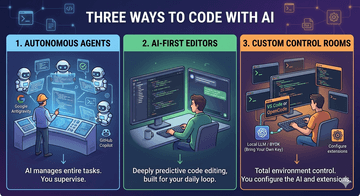
Here is a consolidated, high-level summary of the entire modern AI development landscape, categorized by platform type, core philosophy, and best use case.
The way we write software has completely changed. We have moved far beyond simple code completion. Today, AI coding tools have evolved into complex systems that can manage entire projects, run tests, and debug themselves.
If you are trying to find the right tool for your workflow, it helps to understand that the current landscape is split into three main camps: Autonomous Agents, AI-First Editors, and Custom Control Rooms.
Here is a simple, no-fluff guide to how they work and which one you should choose.
The Big Picture: Three Ways to Code with AI
Instead of trying to compare every tool side-by-side, it's easier to think about how much control you want to hand over to the AI.
                                 AI DEVELOPMENT LANDSCAPE
                                            |
        -------------------------------------------------------------------------
        |                                   |                                   |
[ AUTONOMOUS AGENTS ]               [ AI-FIRST EDITORS ]              [ CUSTOM CONTROL ROOMS ]
  • Antigravity (Google)              • Cursor (Anysphere)              • VS Code (Microsoft)
  • GitHub Copilot (Microsoft)        • Windsurf (Codeium)              • OpenCode (Open Source)
1. Autonomous Agents (The "Hands-Off" Approach)
These tools are built to turn you from a line-by-line coder into a software architect. You give the AI a high-level goal, and it manages the small details.
Antigravity (by Google): This isn't just an editor with an AI sidebar—it's a mission control room. You can tell it to build a feature, and it will spin up multiple background agents to do the work. It even opens its own background version of Google Chrome to test your website, find bugs, and fix them before showing you the final result.
GitHub Copilot (by Microsoft): If your team lives inside GitHub, this tool connects your entire pipeline. It can read a bug ticket (GitHub Issue) in the cloud, plan a multi-file fix, write the code, and submit a fully reviewed Pull Request without you ever needing to copy and paste anything manually.
2. AI-First Editors (The "Perfect Co-Pilot" Approach)
These are complete code editors designed from scratch around the AI chat loop. They focus on speeding up your actual, active daily coding sessions.
Cursor: Widely considered the current gold standard for daily coding. It is incredibly fast and intuitive. Its standout feature is Composer, which lets you edit 5 to 10 files at the same time using a single prompt. It also predicts your next edit point before you even scroll there.
Windsurf: Built by Codeium, this editor stands out because it understands your code while it's actually running. It doesn't just read static text; it actively watches your terminal, your compiler flags, and your runtime errors to help you squash bugs live.
3. Custom Control Rooms (The "Total Control" Approach)
These choices are for developers who want complete privacy, zero subscription fees, or total control over their environment.
OpenCode (Open Source): A lightweight, keyboard-driven tool that runs entirely inside your terminal (TUI). It works alongside any editor you already use. It uses a "Bring Your Own Key" model, meaning you can connect it to free local models running offline on your machine or plug in your own API keys. It also compresses its own memory so it never forgets your project context during long sessions.
VS Code: The traditional, rock-solid baseline. If you don't want a pre-built AI editor, standard VS Code lets you act as a surgeon. You can use open-source extensions like Continue or local tools like Ollama to build a highly private, customized AI setup exactly how you want it.
Quick Reference Summary
Platform | Where it Lives | What it Does Best | Who it is For |
Antigravity | Agent Control Room | Running parallel tasks and automatic browser testing | Developers who want hands-off, autonomous feature building. |
GitHub Copilot | Everywhere / GitHub | Integrating your code directly with cloud issues and PRs | Teams heavily invested in the GitHub Enterprise ecosystem. |
Cursor | Standalone IDE | Whole-file editing and highly fluid code interactions | Developers who want the smoothest, smartest daily driver. |
Windsurf | Standalone IDE | Fixing bugs using live terminal and runtime context | Complex projects where you need an AI that reads live errors. |
OpenCode | Your Terminal | Open-source flexibility and custom LLM connections | Keyboard-centric coders who want complete data privacy. |
VS Code | Standalone IDE | Ultimate configuration control via custom extensions | Engineers who need local-only setups or strict data compliance. |

![[MVP Hook 2] Đừng xây biệt thự khi khách hàng chỉ cần một chỗ trú mưa](/_next/image?url=https%3A%2F%2Fdzpd8l05gmlinfrk.public.blob.vercel-storage.com%2Fuploads%2Fnews%2Fsmall%2F1788593291-3iu67x.jpg&w=256&q=75)

