
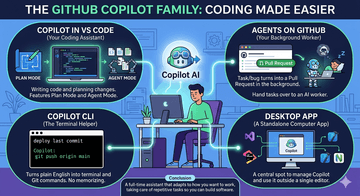
By automating tedious chores and adapting to your workflow across the editor, terminal, desktop, and background tasks, the GitHub Copilot ecosystem acts as a complete development partner that frees you up to focus entirely on building great software.
AI for coding is no longer just about finishing your sentences. Today, GitHub Copilot works like a real partner. It can help you on your computer screen, inside your code editor, or even run tasks in the background while you take a break.
Quick Comparison Table
Tool / App | Where it Lives | Best For... | What it Does |
Inside your code editor | Writing code and planning big changes. | Offers Plan Mode to design ideas and Agent Mode to fix multiple files at once. | |
On GitHub.com (Web) | Doing extra chores without stopping your work. | Takes a task or bug report and builds a Pull Request for you in the background. | |
Your command terminal | Finding the right commands quickly. | Turns plain English into terminal and Git commands so you do not have to memorize them. | |
Desktop App | A standalone computer app | Connecting your tools | Acts as a central spot to manage Copilot and use it outside of a single code editor. |
1. Copilot in VS Code (Your Coding Assistant)
Visual Studio Code is where most of the magic happens. Instead of just giving simple hints, Copilot in VS Code now has two smart ways to help you:
Plan Mode: You talk with the AI to map out a blueprint before writing any code. This ensures you have a good plan first.
Agent Mode: The AI acts on its own. It can look at your whole project, edit multiple files, run tests, and check its own work to make sure everything runs perfectly.
It also gives you Next Edit Suggestions, which guess where you want to click and type next so you can work faster.
2. Agents on GitHub (Your Background Worker)
Sometimes you do not want to stop what you are doing to fix a small bug or a simple task. With Agents on GitHub, you can hand a task over to an AI worker. The AI works in the background and sends you a finished Pull Request when it is done. This keeps your project moving even when you are busy with something else.
3. The Desktop App & Other Editors
If you do not use VS Code, you can still use Copilot.
Desktop App: This is a separate app on your computer that helps bridge your workflows together.
Other Extensions: Copilot works with many other popular tools, including Visual Studio, JetBrains, Xcode, Neovim, and Eclipse.
4. Copilot CLI (The Terminal Helper)
For developers who love using the black-and-white command line terminal, the Copilot CLI is a lifesaver. Instead of searching the internet for complex computer commands, you can just type what you want in plain English, and the CLI will write the correct command for you.
Speed and Freedom of Choice
Much Faster: Copilot is built to be fast. It uses smart technology to give you highly accurate answers without making you wait.
Choose Your AI Brain: You are not stuck with just one AI model. You can let Copilot choose the best model automatically, or you can pick your favorite—including top models like Claude from Anthropic or OpenAI models.
Conclusion
The GitHub Copilot ecosystem is no longer just a tool that types code for you—it is a full-time assistant that adapts to how you want to work.
Whether you need a partner to plan out a major project inside VS Code, a background assistant to handle chore tasks via Agents on GitHub, a helper to guide you through the Copilot CLI, or a central hub using the Desktop App, Copilot has a tool for every step of your day. By taking care of the boring, repetitive parts of coding, these tools let you spend more time focusing on what matters most: building great software.

![[MVP Hook 2] Đừng xây biệt thự khi khách hàng chỉ cần một chỗ trú mưa](/_next/image?url=https%3A%2F%2Fdzpd8l05gmlinfrk.public.blob.vercel-storage.com%2Fuploads%2Fnews%2Fsmall%2F1788593291-3iu67x.jpg&w=256&q=75)

